How to Pick the First 5 Photos Guests See Without Paying for a Full Reshoot
Airbnb and Vrbo may not show the cover photo you picked. How to check what guests really see, pick a cover for your market, and order your first five photos.
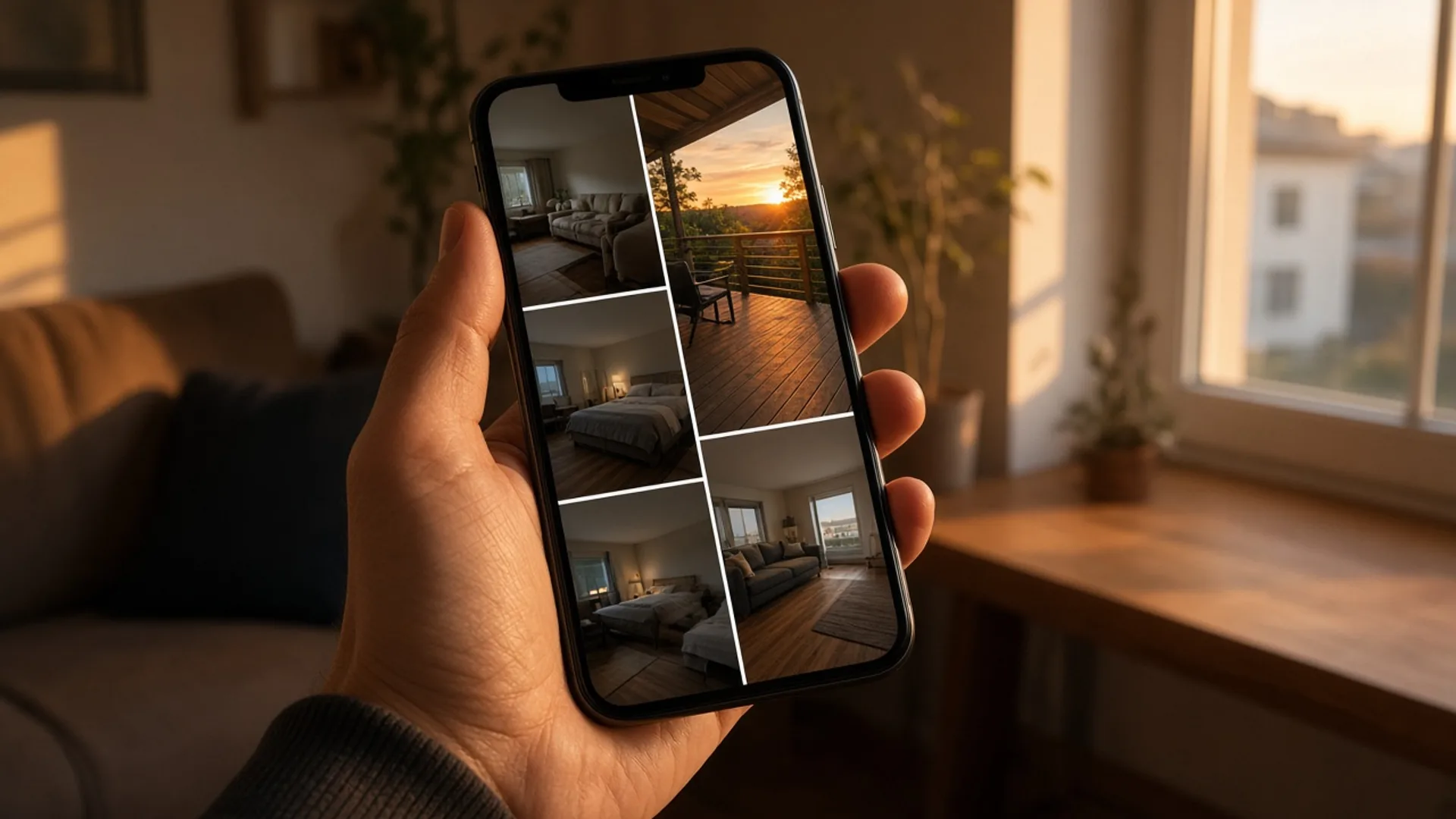
A host got an email from Vrbo this summer.
It said: "Vrbo is testing AI-powered optimizations to improve how your listing images appear in search."
Sounds harmless.
Later, another host in the same BiggerPockets thread checked their listings.
Here's what they wrote:
"AI elected to change my cover photo on both properties. One is the kitchen which is beautiful so whatev. My other property's cover photo is now of the enclosed deck and outside shower, seriously?"
Seriously.
I laughed when I read that. Then I winced.
Because I know that feeling.
You pick your cover photo on purpose. You think about it. Maybe you lose sleep over it.
And then something you never touched decides a guest should see the outside shower first.
Figure
A phone showing a vacation rental search grid where one listing's thumbnail is an outdoor shower, next to brighter thumbnails of living rooms and views
You're not wrong to care this much
Let me say this first.
If you've spent hours on your photos, you're right.
Photos matter. Most hosts already know it. That's why you're reading this.
And your photos are probably fine.
Sharp. Clean. Honest.
The problem usually isn't the photos.
It's which one goes first. And who gets to choose.
Why I care about this
I've been a photographer my whole life.
Weddings. Hotels. Lots of countries. Every kind of light.
I'm also a host. I run more than 50 listings in Philadelphia and New Jersey.
So I've stood on both sides of the camera.
Here's the thing photography taught me: people look at the first picture. Then they decide if they'll look at the second.
Guests are the same.
One host on BiggerPockets put it simply:
Guests decide off the cover and first five images.
That's the whole game.
What's going on with Vrbo and Airbnb
This part matters, so I'll be careful.
Vrbo says it out loud. Its own help page reads: "Vrbo uses an AI-powered tool to choose the best hero image and image order for your listing." It says the tool "will rearrange the photos you have already uploaded" to improve performance. Vrbo also says you can opt out by filling out a survey linked on that page (Vrbo Help).
So on Vrbo, it isn't a rumor. It's how it works now, unless you opt out.
On Airbnb, it's hosts who are reporting it. I haven't found an Airbnb announcement. But hosts keep saying the same thing.
An Airbnb host posted on X that the platform was "randomly displaying a kitchen photo as cover image, completely overriding what I've set." They added: "Cover photo is the #1 conversion driver. This is directly costing me revenue & bookings."
On AirHostsForum, another host wrote: "It keeps changing my cover photo to other pictures that won’t attract guests the way my original photo did."
And one host on BiggerPockets noticed booking sites changing the lead photo based on what guests search for: "If I filter by hot tub, for example, all hero photos shown to me are of hot tubs. A bit disappointing." (BiggerPockets)
That's frustrating.
You did the work. Something else gets the final say.
I can't fix that for you. Nobody outside these companies can.
But you can control two things:
- Which photo you put first.
- How good every photo is, in case a machine moves it up.
That's what the rest of this is about.
The lessons
1. Look at your listing like a stranger
Your host dashboard shows the cover you picked.
Guests may see something else.
A host on AirHostsForum said it plainly: "Those using Vrbo might want to check your listing in incognito guest view mode." And: "Host side looks fine, but AI has changed order in guest view"
So do this:
- Open a private or incognito window.
- Don't log in.
- Search your town and real dates.
- Find your listing the way a guest would.
- Try one or two filters, like "pool" or "hot tub," and look again.
Take a screenshot each time.
Now you know what guests actually see. Not what you hope they see.
2. Pick the cover for your guest, not for you
There's no single "best" cover photo.
It depends on who books your place.
A host on BiggerPockets said it well:
"I think it depends on the market. For me in FL its backyard amenities I.E. twighlight lit up pool. Some properties dont have that so we shift but that is what sellers here. In the mountains it may be a cozy cabin fireplace or a beautiful view. I think knowing your target market is what is important."
A cabin host in another thread noticed the same thing in their market: "People are scrolling past dozens of living room photos but a deck shot with a view stops them."
So ask one question.
Why do people book places like mine?
The pool? The view? The fireplace? The quiet bedroom near the hospital?
Your cover should show that reason.
Then go look at the places you compete with. One host on BiggerPockets suggested you "compare the first five photos against the places you're actually competing with." (BiggerPockets)
If every listing near you leads with a living room, a great deck shot will stand out.
3. Make sure it works when it's tiny
In search, your cover is small.
On a phone, it's about the size of a stamp.
Details vanish. Only light and one clear subject survive.
A host who asked for help on the Airbnb Community Center got this honest reply:
"Your photos - oh dear! Your top photo is of the lobby tiled floor - that is not going to make me click on your listing"
Ouch. But fair.
Try this. Hold your phone at arm's length. Squint.
Can you still tell what the photo is? Does it look bright and warm?
If not, it's not your cover.
4. Don't let the cover promise more than the room gives
This one matters to me as a photographer.
A dramatic shot can win the click and still lose the booking.
Another reply in that same BiggerPockets thread said:
"A hot tub at dusk wins you the click and then can lose you the booking, because the guest opens the listing and the room looks smaller than the first photo promised."
So pick a cover that's true.
The best cover isn't the most exciting one.
It's the one that makes a guest say "yes, that's the place" when they walk in.
5. Your first five photos are not a house tour
Most of us upload photos the way we walk through the house.
Front door. Living room. Kitchen. Bathroom. Bedroom. And the deck at the very end.
That feels natural. It's also backwards.
A host replied in this BiggerPockets thread:
"First four pictures should be your top 4 pictures not the walk through order as you mentioned."
Here's a simple order I like:
- The reason to book. The pool, view, deck or fireplace. Your cover.
- The main living space. Where guests will spend their time.
- The best bedroom. Bright, made bed, curtains open.
- The kitchen or the bathroom. Whichever looks better.
- A second "wow." The other thing people will love. A view, a porch, a reading nook.
Everything else can follow in any order that makes sense.
(We go deeper on this in The First Five Photos Rule.)
6. Every photo is a possible cover now
This is the big one.
If a platform can move any photo to the front, then any photo might be first.
The dark hallway. The cloudy-day patio. The bathroom shot from the doorway.
So here's my rule now: every photo has to be good enough to go first.
You don't need a new shoot for that. You need brighter, cleaner versions of what you already have.
On the new Airbnb Community Center, one host told another (in Italian) that their place was lovely but the photos looked like they were taken on a cloudy day: "Secondo me dovresti rifare tutte le foto per dare l'idea di luminosità" (Airbnb Community Center). My rough translation: redo the photos so they feel bright.
That's it. Brighter.
Brighter. Not fake.
Fix the light. Fix the color. Fix a blown-out window.
Don't add furniture you don't have. Don't swap in a sunset or a view that isn't there. Don't add a hot tub.
Airbnb's rules say it will ask hosts to remove content when AI or other editing is used to hide flaws, hide damage, add amenities or otherwise misrepresent the listing (Airbnb Help Center). And guests notice when a place doesn't match its photos.
You can brighten photos in a phone editor, hire a photographer, or use a tool. I use BNB Boost on my own listings. If you want to see what your weakest photo looks like with the light fixed, you can try it on one photo. Keep the edits to light and color, and compare it to the real room before you upload.
(More on why dim photos hurt good places: Dark Airbnb Photos Make Good Spaces Look Cheap.)
7. Test one thing at a time
I know the itch. You want to change everything at once.
Don't.
If you change the cover, the price and the title in the same week, you'll never know what worked.
A host on BiggerPockets gave advice I agree with: "I would test clicks and bookings before paying for a bunch of video."
Here's a simple routine:
- Write down where you are. Look at your last 30 days of views and bookings in your host dashboard.
- Change one thing. Just the cover photo. Or just the order of photos 2 to 5.
- Wait two to three weeks. Don't touch anything else.
- Check again. Same numbers. Same kind of dates.
- Keep it or switch back.
One catch: if Vrbo's AI is choosing your cover, it's hard to test your own choice. If you want to run a clean test there, look at the opt-out on Vrbo's help page first.
8. Swap your cover with the seasons
If your market changes with the weather, your cover can too.
Deck and lake in summer. Fireplace in winter.
Same honest photos. Just a different one up front when guests want something different.
If a platform already swapped your cover
First, breathe. It's not your fault.
Then:
- Screenshot what guests see. Use a private window, logged out.
- On Vrbo, check the AI photo opt-out on its help page.
- On Airbnb, contact support and send your screenshots.
I won't pretend support is always fast. In that same X thread, a reply read: "My chat keeps getting transferred between agents with zero resolution."
That's why lesson 6 matters so much.
You can't always control which photo goes first.
You can make sure none of them lets you down.
Your 15-minute check
- Open a private window. Find your listing as a guest. Screenshot it.
- Try one filter, like "pool." Screenshot again.
- Ask: what's the number one reason people book places like mine?
- Is that reason your cover? If not, move it up.
- Squint at your cover at arm's length. Still clear? Still bright?
- Reorder photos 2 to 5: living space, best bedroom, kitchen or bath, second "wow."
- Find your three weakest photos. Make them brighter. Not different.
- Write today's date and your views and bookings on a sticky note. Check back in two to three weeks.
What I want you to remember
You're not bad at this.
You care about your photos. That's why you got this far.
The rules changed a little. Platforms now get a say in which photo leads.
So lead with your best. Order the rest on purpose. And make every photo bright enough and true enough to go first.
If your gallery has a few dim ones holding you back, see one fixed with BNB Boost. Or grab your phone editor tonight. Either way, start with the photo you'd least want a guest to see first.
That's where I'd start too.
For the bigger picture on why first impressions matter so much, read Your Airbnb May Not Be Broken. Your First Impression Might Be.
FAQ
Can I stop Airbnb from changing my cover photo?
I haven't found an Airbnb setting for it. Hosts report it happening, and some say support couldn't fix it quickly. Check what guests see in a private window, contact support with screenshots, and make sure every photo near the top is strong.
Can I opt out of Vrbo's AI photo feature?
Vrbo's help page says you can opt out by filling out a survey linked on that page (Vrbo Help).
Should my cover photo be the outside of the house?
Only if the outside is the reason people book. For many places, it's the pool, the view, the deck or a cozy living room. Pick what your guests care about most, and make sure it reads clearly at thumbnail size.
How often should I change my cover photo?
Change it when you have a reason: a test, a new season, or a better photo. Then leave it alone for two to three weeks so you can see whether it helped.
Will brighter photos get me more bookings?
No one can promise that, and I won't. Bright, accurate photos give guests an honest, clear look at your place. Photos that change what's really there can backfire with guests and with Airbnb's rules.
Published October 9, 2026 / 10 min
Related Reading
How to Check If Your Cover Photo Wins the Click in One Minute Without Paying for New Photos
Guests don't reject your whole property first. They reject a thumbnail.
June 6, 2026
6 min
How to Fix Your First Five Airbnb Photos Tonight Without Hiring a Photographer
Your 27th photo can't rescue a weak first impression.
June 3, 2026
6 min
How to Brighten Dark Airbnb Photos in One Sitting Without a Full Reshoot
A dark photo can make a clean home feel old, cold, cramped, or forgotten.
May 27, 2026
6 min