How to Pause or Unlist Your Airbnb Before November 20 in One Afternoon Without Cancelling Guests
Unlisting hides your Airbnb from search but keeps every confirmed stay. Future-date unlisting doesn't block nights, and relisting can take up to 72 hours to show.
Pausing an Airbnb takes a few clicks, but the clicks you pick decide whether guests can still book you, whether you still owe anyone a stay, and how long it takes to come back. This guide is the mechanics only, in Airbnb's own wording, so you can choose before November 20 with your calendar intact.
The date matters because Airbnb's updated house rules policy "applies to all reservations booked on or after November 20, 2026." Some hosts have posted that they plan to step back around then. One French host on the Airbnb Community Center wrote of pausing for three to six months (thread). On another thread, a reply to a host weighing an exit asked: "So you are cancelling all your future bookings? That will be expensive." (thread). Those are the posters' own accounts. For the story of why hosts are talking about leaving, see BNB Host Stories. This page is what each switch does.
What are my options for pausing an Airbnb listing?
Airbnb gives you three listing options plus your calendar. According to Airbnb Help article 476, the first option reads: "Unlist for a set period of time (up to 6 months)." You can also unlist it indefinitely and relist whenever you're ready, or permanently remove it if you'll no longer host, once all confirmed reservations are complete.
"Snoozing" is the word many hosts use, and older forum posts call it deactivating. In Airbnb's current Help Center wording, the switch is called unlisting, and it lives under Listing status in your listing settings. Blocking is a separate tool on your calendar. Airbnb Help article 447 says you can mark nights as available or blocked, and blocked nights aren't available for guests to reserve.
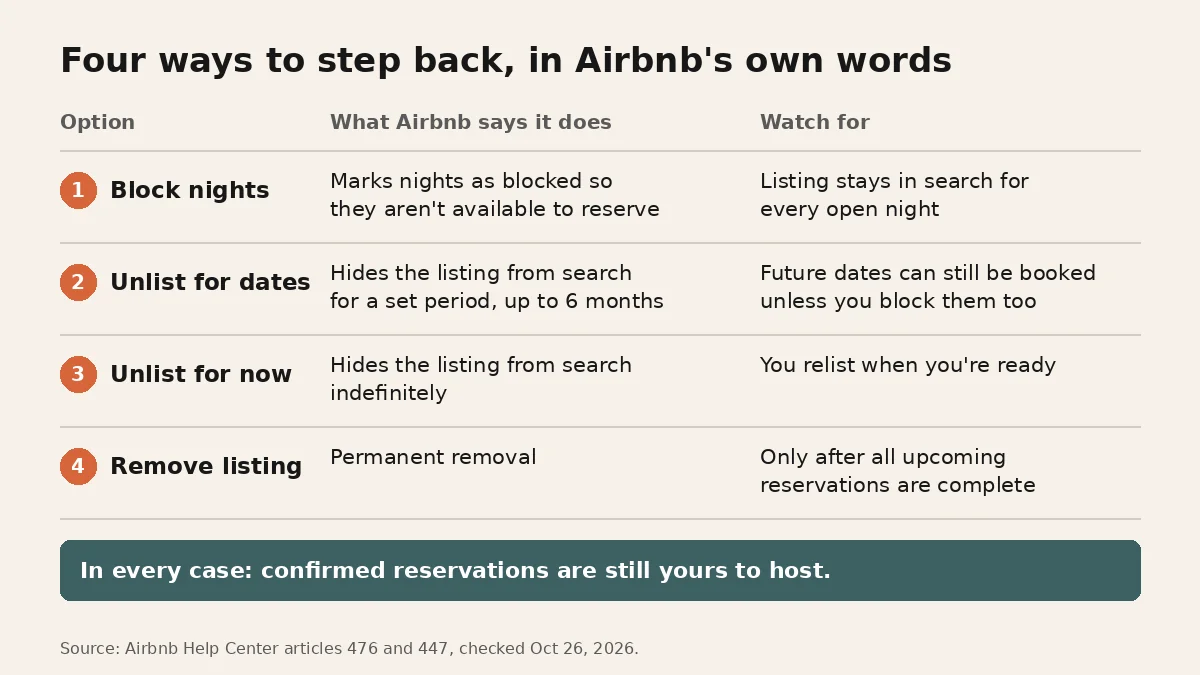
| Option | What Airbnb's page says | Confirmed reservations | What the page doesn't say |
|---|---|---|---|
| Block nights on your calendar | Nights can be marked available or blocked (Help 447) | Not changed by blocking open nights | Nothing about search position while nights are blocked |
| Unlist for specific dates | "Unlist for a set period of time (up to 6 months)." (Help 476) | Still yours to host | Nothing about a ranking penalty or boost |
| Unlist indefinitely | Hidden from search until you relist (Help 476) | Still yours to host | Nothing about a ranking penalty or boost |
| Remove the listing | Only after all reservations are completed (Help 476) | Must be complete first | Reviews stay on your profile and can't be deleted |
Do I still have to host confirmed reservations if I unlist?
Yes. Airbnb's Help Center says it plainly: "If you unlist, you’ll still host your guests for any confirmed reservations." Unlisting stops new guests from finding you in search. It does not cancel, move or shorten the stays already on your calendar.
So a pause that starts today usually starts for real after your last confirmed checkout. Plan the cleaning, the keys and the messages for those guests the same way you would in any other month.
Does unlisting for future dates block my calendar?
No, not by itself. Airbnb Help article 476 says that if you unlist for certain dates in the future, "guests can still book those dates unless you manually block those dates on your calendar."
That is the step hosts miss. If you schedule an unlisting that starts in December, a guest browsing today can still book a night in December. To close the window now, set the unlisting dates and then block the same nights on your calendar.
What happens if I cancel confirmed bookings instead?
It costs you. Airbnb says you can cancel any confirmed reservation, "but the host cancellation fees and other consequences will apply." Nothing on Airbnb's unlisting page requires you to cancel anyone to pause, so this guide doesn't recommend it.
Don't move a confirmed Airbnb guest to another site or to a direct booking to get out of the reservation either. That stay was booked on Airbnb, and Airbnb's cancellation rules are the ones that apply to it. If you're also adding Vrbo or Booking.com, start with new dates only. Our guide to adding a second channel without double bookings covers the calendar side, and our fall 2026 cancellations piece covers the guest side.
Can I permanently remove my listing with bookings still on the calendar?
No. Airbnb's page says you can unlist at any time, "but your listing can’t be permanently removed until all reservations are completed." Unlist first, host the stays you've already accepted, then remove it if you still want to.
Your reviews don't disappear either way. The same Help article says that if your listing has been unlisted, any associated reviews on the listing will still appear on your profile and can't be deleted.
Does pausing my Airbnb hurt my ranking?
Airbnb doesn't publish a ranking penalty or a ranking boost for unlisting, so nobody can promise you either. What Airbnb does publish is narrower.
- While you're unlisted, you're not in search. Help 476 describes unlisting as hiding the listing from search results.
- Availability is a search factor. Airbnb's search article says "The more dates a listing is available, the more likely it is compatible with a guest’s plans." A paused listing earns no bookings and no new reviews during the pause.
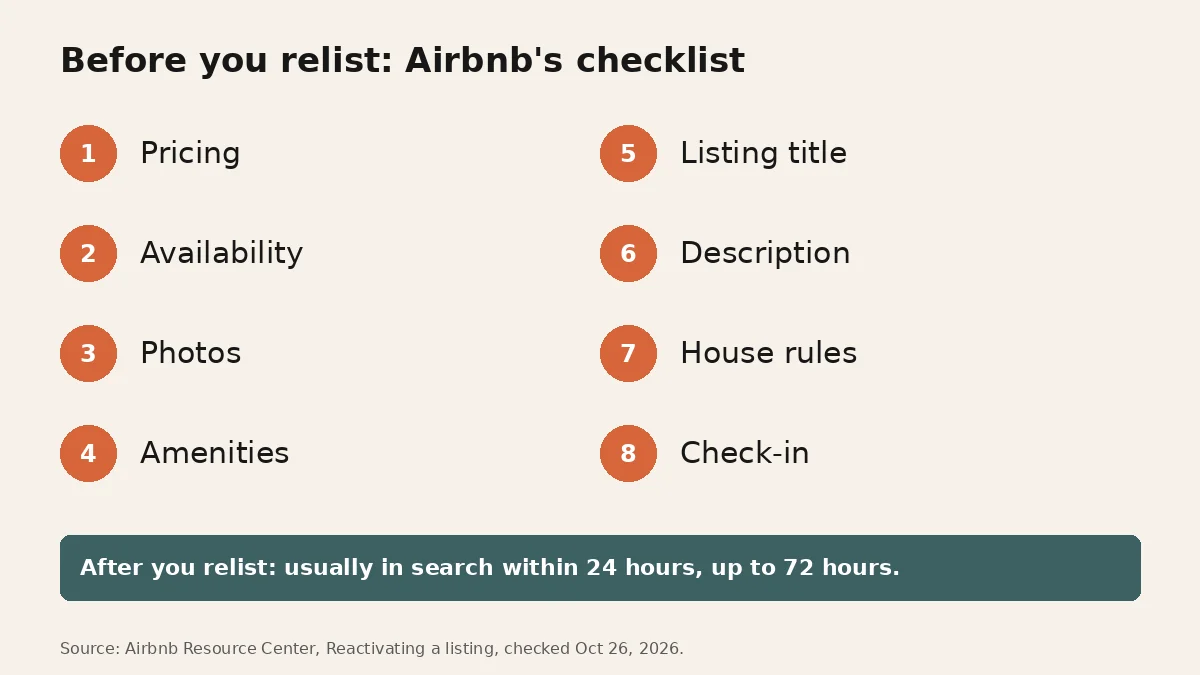
- Coming back takes a little time. Airbnb's Resource Center says that once you relist, guests can usually find your place within 24 hours, "but it may take up to 72 hours."
Anything beyond that, including claims that a pause resets your history or that relisting gives you a fresh-listing bump, is guesswork. Airbnb's pages don't say it.
Is blocking November 20 the same as pausing my listing?
No. Blocking a night closes that night on your calendar while your listing stays in search for every other open date. Some forum threads have discussed hosts blocking November 20 itself. Whether you do is your call, and mechanically it is a calendar block, not an unlisting.
Keep in mind what the date means in Airbnb's own policy page: the new house rules policy applies to reservations booked on or after November 20, 2026. It is a booking date, not a stay date. Our Nov 20 guest rules guide covers what changes for those bookings, and rewriting your house rules covers the listing text, so neither is repeated here.
Which option fits my situation?
Match the switch to what you actually want to stop. If the goal is to keep hosting on Airbnb while you think, read our piece on platform risk for hosts before you change anything.
| If you want to | Use | Then |
|---|---|---|
| Take a few nights or a week off | Block those nights on your calendar | Stay listed for every other date |
| Step out of search for a known stretch | Unlist for specific dates, up to 6 months | Block the same nights so nobody books them now |
| Step out with no end date yet | Unlist indefinitely | Relist when you're ready |
| Stop hosting this place for good | Unlist now, remove later | Remove only after every confirmed stay is complete |
| Keep Airbnb and add another site | Stay listed | Add one channel and sync calendars both ways first |
How do I pause my Airbnb in one afternoon?
- List every confirmed reservation. Note the last checkout date. Those stays happen whatever you choose.
- Pick your window. Decide the first night you don't want to host, and whether you know the last one.
- Change the listing status. On desktop, Help 476 lists the path: Listings, select the listing, Listing editor, Settings, then Listing status under Edit preferences. Click Unlisted, then Choose dates for a set period or Unlist for now for no end date.
- Block the same nights on your calendar. Open Calendar, select the nights and mark them Blocked. This is the step that stops future-date bookings now.
- Check from a guest's side. Search your area for the paused dates and confirm the listing doesn't appear and the nights can't be booked.
- Write down your relist date and the checklist below, so coming back is one sitting, not a scramble.
What should I check before I relist?
Airbnb's Resource Center article Reactivating a listing gives a short checklist: pricing against similar listings nearby, an up-to-date calendar, photos, amenities, the listing title and description, house rules and requests, and check-in instructions.
Photos are the item most hosts skip. Airbnb's checklist says: "Take new, high-quality photos to reflect the current state of your space." If you paused through a season, your current set may show summer light in a December listing, or a room you've since changed. Reshoot anything that changed, and put the strongest, most accurate shot first, as our guide to Airbnb cover photo order explains.
If the rooms are the same and only the light looks dated or flat, a photo enhancer for Airbnb can even out brightness and color across the set while leaving every room exactly as it is. Better photos won't change a policy or guarantee where you land in search. They make sure the listing guests see after the pause matches the place they'll walk into.
Then relist from the same Listing status menu, and give search up to 72 hours before you judge anything. A quiet first day back is normal by Airbnb's own timeline.
FAQ
How long can I pause my Airbnb listing?
Airbnb's Help Center lets you "Unlist for a set period of time (up to 6 months)." You can also unlist indefinitely and relist whenever you're ready.
Do I still have to host my confirmed reservations if I unlist?
Yes. Airbnb's Help Center says: "If you unlist, you’ll still host your guests for any confirmed reservations." Unlisting only stops new bookings from search.
Does unlisting for future dates block my calendar?
No. Airbnb says that for future dates "guests can still book those dates unless you manually block those dates on your calendar." Block the nights on your calendar as well.
What happens if I cancel my confirmed bookings to pause?
Airbnb says you can cancel, "but the host cancellation fees and other consequences will apply." Unlisting does not require cancelling anyone.
Will I lose my reviews if I unlist or remove my Airbnb?
Airbnb's Help Center says that if your listing has been unlisted, any associated reviews on the listing will still appear on your profile and can't be deleted.
How long until a relisted Airbnb shows in search again?
Airbnb's Resource Center says guests can usually find a relisted place within 24 hours, but it "may take up to 72 hours." Airbnb doesn't publish a ranking penalty or boost for having paused.
Published October 26, 2026 / 9 min
More in Pricing.
Related Reading
How to Track Santa Barbara, Hoboken, New Haven, New Orleans, Sarasota and Augusta Rental Rule Changes in One Week Without Reading Every Ordinance
Fall 2026 short-term rental rule changes in Santa Barbara, Encinitas, Hoboken, New Haven, New Orleans, Sarasota and Augusta: status, dates, sources.
October 28, 2026
11 min
How to Add Vrbo or Booking.com to Your Airbnb in One Afternoon Without Double Bookings
A host asked this week whether one property can sit on more than one platform. Here is the afternoon order: one extra channel, calendars synced both ways, a hand check, the guest's total, and the same photos.
October 23, 2026
9 min
What Happens When Airbnb Changes the Rules
The policy update email ran four paragraphs. The fifth line changed how cancellations worked for every reservation already sitting on a host's calendar.
March 11, 2026
7 min
How to Apply Airbnb's Nov 20 Guest Rules in One Afternoon Without Collecting ID Copies
For reservations booked on or after November 20, 2026, Airbnb's help page limits guest contracts, ID copies, required apps, and background checks. Here is what hosts can still do, quoted from the help pages.
October 22, 2026
16 min
How to Rewrite Your Airbnb House Rules in 20 Minutes Without Getting Your Listing Flagged
On Oct 20, 2026, Airbnb told hosts it is rewriting how house rules work. If your checkout list asks guests to wash dishes, strip beds or haul the trash out, you have about a month to fix it.
October 21, 2026
20 min
How to Refill Your Calendar After Cancellations Without Changing Your Rules in a Panic
Two cancellations for every new booking isn't in your head. Here's what's driving it, what's out of your hands, and a practical plan to protect and refill your calendar.
October 7, 2026
8 min